
The best trophy winner tracking software may not be the system with the longest feature list. If winners’ names and years are scattered across engraved trophies, honours boards and spreadsheets, the real test is whether your organisation can find, verify and preserve each record over time.
It’s easy to confuse two different needs: digitising historical winners and recording new results season by season. A searchable archive can make past honours easier to access, but that doesn’t automatically mean it supports an ongoing results workflow. Start by identifying which problem you need to solve.
This guide compares practical options, from spreadsheets and awards-management platforms to trophy-focused digital archives. You’ll learn what to check for search, verification, sharing and exports, and how to distinguish historical transcription from recurring winner tracking. We’ll also explain where Trophy Guru may fit: it uses AI-assisted transcription to turn existing trophy and honours-board records into a searchable digital archive, with an online honours board and CSV export. By the end, you’ll have a clearer basis for choosing a system that suits your records and workflow.
Key Takeaways
- Choose trophy winner tracking software by how well it supports your record lifecycle, not simply by how many features it lists.
- Compare spreadsheets, general club platforms and trophy-focused archives for searching, handling historical images, exporting and updating records.
- Before committing, define who will use the records, what details you need to capture and how corrections will be checked against original sources.
- Trophy Guru offers AI-assisted transcription, a searchable archive, an online honours board and CSV export for preserving existing trophy records.
- Check whether a system fits your organisation’s ongoing results process as well as its historical archive needs.
Table of Contents
- Trophy Winner Tracking Software: Buyer Expectations
- Three types of trophy winner tracking software to compare
- How to compare winner tracking software features without missing the essentials
- Choose trophy winner tracking software for your organisation’s real workflow
- Why Trophy Guru belongs on a trophy winner software shortlist
Trophy Winner Tracking Software: Buyer Expectations
A useful winner-record system does more than store names. It helps an organisation organise awards, retrieve past results and maintain clear records as people and responsibilities change. Awards can take forms such as trophies, medals or plaques, each serving as a token of recognition. The record system should make the achievement behind each one easier to identify and verify.
Judge trophy winner tracking software against the records and tasks it needs to support. A collection of historic engravings creates different requirements from a competition that adds winners every season.
What does a trophy winner tracking system need to manage?
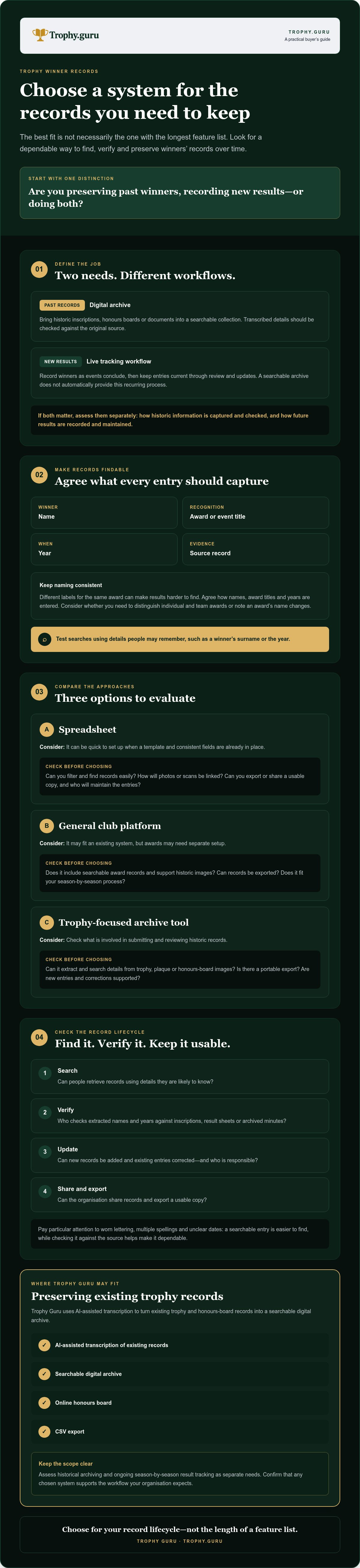
Start with the information someone will need to find later. A practical record might include the winner’s name, award or event title, year and source, such as an inscription, result sheet or archived minutes. Depending on your organisation, you may also need to distinguish individual and team awards or note changes in an award’s name over time.
Consistent fields make searching more reliable. If one volunteer records “Junior Cup” and another enters “Under-18s Trophy”, a search for only one title may miss relevant results. Agree on how names, award titles and years should be recorded, then check that your chosen system can represent the awards and source material you hold. Look for search options based on details people are likely to remember, such as a winner’s surname or the year.
Historical archive or ongoing winner tracking?
Photographing existing trophies or honours boards and transcribing their inscriptions can help build a historical archive. It brings older records into a searchable format, but doesn’t necessarily provide a process for entering each new season’s results. Live tracking means adding new winners as events conclude and keeping the record current over time.
Before choosing, ask whether new records can be added and existing entries corrected, and who will do that work. Don’t assume an archive automatically supports a recurring competition workflow. If both needs matter, assess them separately: first, how historical information is captured and checked; then, how future results will be recorded and maintained.
At a glance
- Digital archive: A searchable collection of past winner records, often created from existing inscriptions or documents.
- Live tracking workflow: A process for recording new results over time, with a way to review and update entries.
This distinction also helps set sensible expectations for transcription. Check extracted names and years against the original inscription or source record, especially where lettering is worn, names have multiple spellings or dates are unclear. A searchable entry is easier to find, while verification helps make it dependable.
Three types of trophy winner tracking software to compare
Most organisations can start by comparing three approaches: a spreadsheet, a general club platform or a trophy-focused archive tool. Each can help organise records, but they differ in setup, handling of historic material and support for ongoing updates. Treat the features below as questions to check with the provider, not guarantees about what each category includes.
| Approach | Setup effort | Search and historical images | Export and ongoing updates |
|---|---|---|---|
| Spreadsheet | Can be quick if a template and consistent fields are already in place. | Can you filter and find records easily? How will photos or scans be linked? | Can you export or share a usable copy? Who will maintain entries? |
| General club platform | May fit an existing system, but check whether awards need separate setup. | Does it include searchable award records and support historic images? | Can records be exported? Does the platform support your season-by-season process? |
| Trophy-focused archive tool | Check what’s involved in submitting and reviewing historic records. | Can it extract and search details from trophy, plaque or honours-board images? | Is there a portable export? Check whether new entries and corrections are supported. |
Spreadsheets and general club-management platforms
Spreadsheets are familiar and flexible, but their usefulness depends on consistent data entry. A shared file may be easy to start; a reliable handover still needs clear field names, tidy records and a defined update process. For a practical look at this option, read our Excel for sports club records guide.
A general club platform may keep awards closer to other club information. Check whether it has dedicated award fields, useful search and export, or whether winners would need to be stored in notes or a separate file. The best fit depends on the workflow your organisation already uses.
Trophy-focused digitisation and archive tools
These tools are designed to turn information on existing trophies, plaques or honours boards into digital records. Trophy Guru, for example, uses AI-assisted transcription and offers a searchable archive, an online honours board and CSV export. These features support historical record capture and access. Check separately whether ongoing winner entry and amendments meet your needs.
If your priority is preserving existing engraved results in a searchable form, you can explore Trophy Guru’s trophy archive as one option. Consider your needs for future seasons as well.
How to compare winner tracking software features without missing the essentials
A polished interface won’t make an unreliable record dependable. Assess each option against the everyday tasks your organisation needs to complete: finding an entry, checking its source, correcting an error and keeping a usable copy. Use the checklist below during demonstrations or provider enquiries, and record the answers so you can compare options consistently.
- Search: Can you find a record by winner, award title or year? Can searches handle spelling variations or partial names?
- Structured details: Can the system store the fields your organisation uses, rather than leaving important context in free-text notes?
- Source and verification: Can you identify the original photograph, trophy, result sheet or document behind an entry?
- Corrections: How do you report a transcription error, and what happens after you flag it? Can your organisation make amendments, or does the provider need to do so?
- Export and continuity: Can you export records in a format you can reuse? Ask what happens to access and records if your organisation changes provider or its administrator.
Search, metadata and record accuracy
Good search depends on useful metadata: details attached to a record that help people find and interpret it. Winner names, award titles and years are a starting point. Add the source, such as a particular honours-board image or result document, so someone can return to the evidence when a spelling or date needs checking. For more on structuring entries, see our guide to searchable honours board records and metadata.
Image-based transcription needs review. Worn engraving, reflections, low contrast or an unclear photograph can make letters and numbers difficult to distinguish. A sensible workflow is to capture a legible image, extract the likely text using transcription software, compare each name and year with the original, then flag uncertain entries for checking. Treat the digital text as a draft until it has been verified.
Export, correction and long-term access
Test the export rather than relying on a feature label. Ask for a sample or demonstration, then check whether names, award titles, years and source details remain clear in the exported file. Confirm the correction process before you commit: who receives a reported error, how it is reviewed and how you’ll know the record has been amended.
Finally, ask how access is managed and how records remain available as volunteers change or responsibilities pass to someone new. Arrangements vary by provider, so get clear answers about access, continuity and any limits on exporting or retrieving the archive. A system is only a lasting record if your organisation can keep using and understanding its information.
Choose trophy winner tracking software for your organisation’s real workflow
The right choice depends on what your organisation needs to preserve and who will look after the records. A sports club entering new season results, a school keeping a history of prizes and a heritage collection documenting older awards may need different tools. Use this five-step process to create a shortlist based on real tasks, not assumptions.
- Gather the records. List what you hold: trophy inscriptions, honours-board details, result sheets, spreadsheets or other documents. Note gaps and difficult-to-read entries.
- Define the users. Identify who will search the archive, check records and handle new results. Consider the needs of people who will inherit those tasks.
- Set requirements. Separate essentials from preferences. Searchable historic entries and a reusable export may be essential, while a public display may suit some organisations but not others.
- Test shortlisted systems. Use representative records from different years and award types, including older or hard-to-read inscriptions. Check the complete process, from finding an entry to reviewing and exporting it.
- Review before deciding. Compare what worked, note unanswered questions and confirm that the system can support the work you expect to continue doing.
Match the shortlist to your record-keeping situation
For a small archive, prioritise manageable setup, searchable entries and a straightforward way to keep a copy of the records. If you have several award types, check that fields can be applied consistently and that users can locate each award without knowing its exact wording. For ongoing seasons, ask providers directly how new winners are entered, how records are amended and who is responsible for updates.
For broader project planning, see this guide to digitising sports club award records. Use it to think through the material you have before selecting a tool.
Run a practical software evaluation
Build a small test set that reflects your actual archive: different years, awards and source types, plus entries where engraving or handwriting may be unclear. Check whether searches return the expected records, whether extracted details need correction and whether exported data remains understandable outside the system. A neat demonstration using clean sample data won’t reveal every practical issue.
Keep a short evaluation log. Record any uncertainty about permissions, support, correction steps or adding future results, and ask the provider to clarify before you commit. This gives decision-makers a clear basis for comparing options and helps prevent workflow gaps from emerging after records have been moved.
If a trophy-focused archive suits your historical records, explore Trophy Guru’s digital archive as one option, then check whether it meets your requirements for ongoing entries and amendments.
Why Trophy Guru belongs on a trophy winner software shortlist
Trophy Guru is a trophy-focused option for organisations that want to bring existing engraved records into a searchable digital archive. It uses AI-assisted transcription to extract names, years and other details from images of trophies, plaques, honours boards and result sheets. This can make information that’s difficult to search on a physical display easier to look up.
Assess this use case separately from ongoing season-by-season tracking. Trophy Guru’s features focus on digitising and sharing historical records. Before choosing it for ongoing results management, ask whether it supports your process for entering new winners and amending entries over time.
Where Trophy Guru may fit your shortlist
The service combines AI-assisted transcription with a searchable archive, an online honours board and CSV export. The honours board provides an online way to present archived results, while CSV export gives your organisation a portable copy for use in another workflow. Check that the export includes the fields your organisation needs, and ask how access to the online board suits your intended audience.
This may suit organisations whose main challenge is preserving existing winners rather than managing the whole competition process. A club with engraved past results, for example, can assess whether its historic inscriptions can be transcribed into searchable entries. The same distinction applies to schools and heritage collections: first consider how well the archive handles existing material, then check separately whether it supports future updates.
What to confirm before getting started
Before selecting any archive tool, ask how new winner records are added and how existing entries can be amended. Check who reviews transcription results, how errors are reported and what steps are available when an image is difficult to read. Test the process with representative records, including a clear inscription and an older or less legible source, so you can judge whether the results suit your archive.
Trophy Guru offers a free initial trophy transcription, with paid processing available for additional trophies. Use the initial transcription to assess how your source material translates into a digital record, then compare the result with the original. It’s a practical first check, alongside confirming that the service supports the ongoing workflow your organisation needs.
Try one trophy transcription free and assess how well it handles a representative record from your collection.
Put your trophy records on a clearer footing
Choose trophy winner tracking software by the work it needs to support. Searchable records, consistent details, reliable exports and a clear way to verify entries matter more than a long feature list. Just as important, distinguish digitising historical winners from recording and amending results as each new season progresses.
If your priority is preserving existing trophy and honours-board records, Trophy Guru offers AI-assisted transcription, a searchable digital archive, an online honours board and CSV export. One initial trophy transcription is free, with one-time paid processing for additional trophies. Check whether its entry and editing workflows meet your ongoing needs.
Start with a representative record. Compare the transcription with its source, consider how you’d share or export the result, and decide whether the archive fits your organisation’s process. Try one trophy transcription free and see how your records can become easier to find and preserve.
Frequently Asked Questions
What is trophy winner tracking software?
Trophy winner tracking software helps an organisation record, search and maintain information about awards and their recipients. Depending on the tool, it may support new results each season, digitise historical inscriptions, or both. Useful details often include the winner’s name, award or event, year and source. Before choosing, check that the system suits your record types and supports the way your organisation needs to update and retrieve them.
Can software read names engraved on old trophies?
Some tools use AI-assisted transcription to extract names, years and other details from trophy photographs, but results depend on the source image. Worn engraving, reflections, unclear lettering or poor contrast can make details difficult to read. Treat extracted text as a draft: compare it with the original trophy or record, and check uncertain names and dates before relying on the digital entry. Ask how errors can be flagged and corrected.
How do I choose software for tracking club trophy winners?
Start by listing the records you have and the tasks the system must support. Decide whether you’re digitising past inscriptions, recording new results each season, or doing both. Then compare options for search, consistent fields, source verification, corrections and export. Test representative records, including older or unclear examples. Ask providers to demonstrate essential workflows, and confirm who will maintain records as club responsibilities change.
Does trophy winner software replace a spreadsheet?
Not necessarily. A spreadsheet may remain practical if records are consistent, easy to search and maintained by someone who can hand the task on clearly. A dedicated archive may better suit historical inscriptions or public access, while a club platform may bring awards alongside other club records. Check whether the software can import or export information in a reusable format before replacing an existing spreadsheet or running both systems.
Can Trophy Guru track new winners every season?
Trophy Guru focuses on transcribing existing trophy and honours-board records into a searchable archive, presenting an online honours board and exporting records to CSV. Before relying on it for season-by-season entry and editing, ask Trophy Guru how new winners can be added, whether existing entries can be amended and who handles those updates.
Can I export trophy winner records to CSV?
Yes. Trophy Guru offers CSV archive export, providing a portable file of records for use in another workflow. Before relying on an export, check that it includes the fields your organisation needs, such as winner names, award titles and years, and that the information remains clear when opened in your chosen spreadsheet software. An export can also help your organisation retain a usable copy outside its day-to-day archive.
How much does trophy winner tracking software cost?
Costs depend on the type of system and what your organisation needs, so compare the pricing model as well as the features. Trophy Guru lets users try one trophy transcription free; processing additional trophies is paid for on a one-time basis. Check current terms with the provider, and ask other vendors whether pricing depends on users, records, features or contract length.