

Club heritage rarely survives committee turnover when it remains locked behind fading varnish or forgotten paper ledgers. When you need to export club records to csv, you are not simply reordering administrative files; you are protecting decades of member achievements from disappearing during the next leadership transition.
If your club is like most, decades of history remain trapped on physical honours boards and paper sheets. Retyping those historical engravings by hand into spreadsheets is tedious work, and a single typo can misplace a championship year forever. It's completely natural to worry about losing irreplaceable records whenever personnel change or administration platforms update.
Fortunately, turning physical awards into flexible data doesn't have to be overwhelming. In this guide, you will discover how to cleanly export historical club records, honours boards, and trophy archives to CSV for seamless data management. We'll walk through the best practices for structuring clean datasets, maintaining complete data ownership, and creating future-proof digital backups that keep your club's legacy secure.
Key Takeaways
- Universal plain-text formatting makes CSV the most reliable standard for safeguarding heritage records across generations of committee handovers.
- Follow a structured workflow to audit fragmented archives and cleanly export club records to csv without formatting loss.
- A standardized data schema ensures historical winner lists transfer seamlessly between modern spreadsheets and digital honours boards.
- Simple data cleansing steps resolve common delimiter conflicts and character encoding errors before records become corrupted.
- Modern transcription tools bridge physical silverware engravings directly into structured digital datasets, eliminating manual spreadsheet entry.
Table of Contents
- Why CSV Is the Essential Standard for Club Archival Records
- Step-by-Step Guide: Export Club Records to CSV Format
- Structuring CSV Data Architecture for Honours Boards and Trophy Winners
- Troubleshooting Common CSV Export Errors and Data Cleansing Challenges
- Automating Your Club Archive with Trophy Guru CSV Export Tools
Why CSV Is the Essential Standard for Club Archival Records
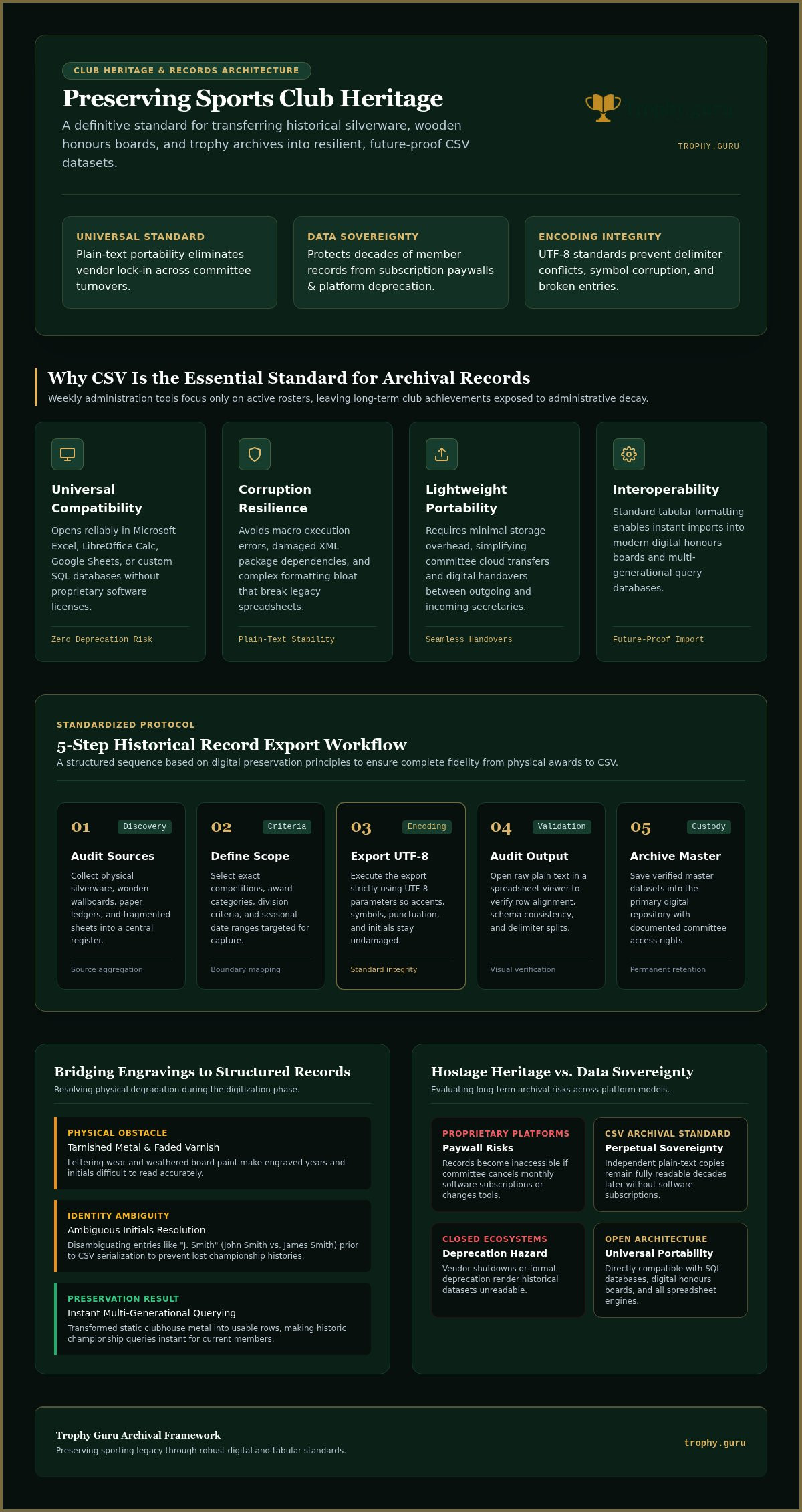
Most club administrative tools focus exclusively on weekly operations, such as current rosters, membership renewals, and active match fees. While these systems manage immediate club needs, they frequently ignore decades of heritage. When you need to preserve historical honours boards and trophy winners, relying on closed platforms creates massive risks. To protect your heritage across generations, you must establish an open standard. The format known as Comma-separated values (CSV) remains the gold standard for long-term historical preservation.
CSV files store plain text separated by commas. That plainness is their greatest strength. Because the format is universal, your records open reliably in Microsoft Excel, LibreOffice Calc, Google Sheets, or custom SQL databases without special converters. Unlike proprietary software formats that deprecate over time, a plain-text file created today will remain perfectly readable decades from now.
Adopting CSV provides several vital advantages for volunteer committees:
- Universal compatibility: Incoming officers can immediately open archives without needing identical operating systems or specialized licenses.
- Resilience against corruption: Plain-text files avoid the macro errors, broken XML dependencies, and formatting bloat that ruin complex spreadsheets.
- Lightweight portability: Plain text requires negligible storage space, simplifying cloud backups and digital transfers between outgoing and incoming secretaries.
- Interoperability: Clean tabular structures allow seamless imports into modern digital honours board platforms.
Eliminating Vendor Lock-In for Sports Club History
Proprietary club management platforms present a hidden hazard: hostage heritage. If your committee switches software providers or cancels a subscription, decades of digitized achievements can suddenly disappear behind a paywall. Deciding to export club records to csv guarantees perpetual data sovereignty. When your club retains independent plain-text copies, you protect your history from recurring licensing costs, platform shutdowns, or unexpected software changes.
Bridging Physical Trophies and Digital Club Spreadsheets
Decades of historic silverware sit behind glass cases, invisible to anyone outside the physical clubhouse. Without structured capture, those engraved names remain trapped in the past. Translating engravings into structured rows transforms stagnant metal into usable information. Once you export club records to csv, querying a specific historic season or tracking multi-generational club champions becomes instant. Preparing your source materials accurately is essential, so consider reviewing best practices to organize physical award records before starting the digital capture process.
Step-by-Step Guide: Export Club Records to CSV Format
Generating a clean archival export requires more than clicking a download button inside an administrative dashboard. If your raw inputs are flawed, your output will be scrambled. Historical records demand deliberate validation before you generate tabular files. By following established principles, such as those outlined in the Digital Preservation Handbook, volunteer administrators can cleanly bridge old physical records and modern software environments.
A reliable export process follows five sequential steps:
- Audit existing sources: Gather physical silverware, wallboards, paper ledgers, and fragmented spreadsheets into a central review list.
- Define the archival scope: Choose the exact competitions, award categories, and seasonal date ranges you plan to digitize.
- Initiate export with UTF-8 encoding: Generate the file using UTF-8 parameters to ensure accents, symbols, and punctuation remain intact.
- Audit the output: Open the exported plain text in a spreadsheet viewer to confirm rows and columns align correctly.
- Archive the master file: Save the verified dataset in your club's primary digital repository with clear access permissions.
Preparing Historical Records for Clean Data Extraction
Physical awards present unique transcription challenges. Inspect tarnished trophies and wooden honours boards for faded paint, worn lettering, and ambiguous initials. Clarify whether "J. Smith" refers to John Smith or James Smith before converting records to text. Standardize recurring competition names; entering "Men's Singles Champion" in 1984 and "Senior Men's Winner" in 1985 creates split categories that complicate future searches.
Executing and Auditing the CSV Export Process
When you are ready to export club records to csv, character encoding settings require close attention. Always select UTF-8. Without this standard, special characters like accented surnames or hyphens convert into unreadable symbols. Once downloaded, open the file to confirm text qualifiers work properly. Descriptions containing internal commas must sit inside quotation marks so the software doesn't split a single award note across two separate columns.
Establishing Version Control for Club Handover Protocols
Prevent accidental record loss by adopting clear file naming conventions. Label master files with the club abbreviation, archive type, and date formatted as YYYY-MM-DD (for example, RFC_HonoursBoard_Master_2026-09-30.csv). Keep this primary export file marked as read-only, distributing separate working copies for routine annual updates. If you want to streamline this initial physical capture, you can test automated transcription with Trophy Guru to convert trophy photos straight into structured datasets without tedious manual entry.
Structuring CSV Data Architecture for Honours Boards and Trophy Winners
Most database guides focus on sales pipelines or current match scores. They fail to address perpetual awards, historical gifts, or governance roles. When you design an archive schema, you need a layout tailored to sports heritage. Aligning your file structure with recommended data formats for preservation guarantees that future club volunteers can query your records without untangling conflicting cells.
A resilient club schema relies on structured atomic fields. Keep individual pieces of information separate so your data remains filterable across decades of seasons.
Essential Core Columns for Trophy and Winner Records
Every trophy archive requires clear baseline columns. When you export club records to csv, include distinct headers for Award_Name, Year_Awarded, First_Name, and Last_Name. Splitting recipient names into individual fields makes sorting by family dynasties or individual career achievements effortless. For team events, add dedicated columns for Team_Name, Crew_Position, or Age_Grade so multi-player accomplishments remain cleanly attributed.
Secondary Heritage Metadata to Include in Archival Columns
Physical awards carry deep sentimental and material history. Capture this context directly alongside winner names using secondary metadata fields:
- Trophy_Provenance: Details regarding the original donor, silversmith hallmarks, or initial deed of gift.
- Physical_Location: The trophy's placement in the clubhouse display cabinet, storage vault, or on perpetual loan.
- Historical_Notes: Contextual documentation for shared titles, ties, abandoned seasons during wartime, or cancelled tournaments.
Formatting Best Practices for Spreadsheet Interoperability
Clean formatting prevents import failures. Always use four-digit numbers for years, such as 1924 rather than '24, which prevents software from defaulting to modern centuries. Eliminate trailing whitespace at the ends of words, and avoid hard line breaks within cells. Following these formatting habits ensures smooth transitions whenever you export club records to csv to feed modern digital display software or club website archives.
Troubleshooting Common CSV Export Errors and Data Cleansing Challenges
Opening an exported file only to find misaligned columns or scrambled text is frustrating. Real-world archives rarely transfer without friction. Historical club records present unique cleansing hurdles, from century-old typography to varied volunteer notation styles. Identifying these friction points early keeps your archive accurate.
Most file export problems trace back to four primary culprits:
- Unescaped delimiters: Commas sitting inside club titles, citations, or award names break the column grid.
- Encoding mismatches: Systems defaulting to legacy ANSI or ASCII corrupt apostrophes, hyphens, and accented vowels.
- Regional format differences: Software operating in certain non-UK locales often replaces comma delimiters with semicolons.
- Fragmented player identities: Multiple variations of a single member's name scatter historical records across unrelated rows.
Fixing Comma Delimiter Clashes and Text Formatting Issues
Delimiters tell spreadsheet applications where one column ends and the next begins. When an award description contains punctuation (such as "President's Cup, Mixed Pairs"), the software treats that inner comma as a structural divider, pushing subsequent text into the wrong field. To fix this, enclose text fields containing punctuation in double quotation marks. When importing data from European spreadsheet software, convert semicolon separators back to standard commas to preserve structural integrity.
Resolving Inconsistent Historical Names and Duplicate Entries
Member naming conventions shift across generations. In 1932, a champion might appear as "R. J. Davies"; by 1938, the same player might be recorded as "Robert Davies". When you export club records to csv, unresolved variations fragment personal timelines. Create an auxiliary "Standardized Member Name" column to tether scattered historical citations to a single identity. This extra layer also helps you differentiate father-and-son champions who share identical initials across consecutive decades.
Cleaning messy spreadsheets by hand takes valuable volunteer hours. If you want to bypass manual cleanup, export clean club records with Trophy Guru to automatically capture structured names, dates, and engravings straight into ready-to-use CSV files.
Automating Your Club Archive with Trophy Guru CSV Export Tools
Manual data entry burns out volunteers. When a club committee decides to modernize decades of silverware, typing names, initials, and dates line by line into a blank spreadsheet takes weeks of tedious effort. Most administrative platforms provide no solution for this backlog, expecting administrators to retype old archives through generic web forms. Trophy Guru changes that dynamic by serving as the direct bridge between unsearchable physical boards and flexible spreadsheets.
Our purpose-built platform pairs computer vision with automated data extraction. You turn physical silver cups and wooden boards into structured tabular datasets without manual typing. Once processed, our CSV Archive Export gives you complete control over your raw club records with zero operational friction.
Converting Physical Trophies into Structured CSV Files
Digitizing your historical collection requires only three simple actions:
- Capture clear photographs: Take standard digital photos of your club trophies, shields, and honours boards using a smartphone.
- Deploy AI Trophy Transcription: Our machine learning models read ornate typography, curved engravings, and historical fonts, extracting recipient names, years, and competition titles with archival precision.
- Review and download: Verify the transcribed details on screen, make quick adjustments if needed, and export your structured archive in seconds.
Complete Data Portability with Zero Platform Lock-In
Club heritage belongs entirely to your membership, never to a third-party software provider. While Trophy Guru offers dedicated Digital Honours Board Hosting to showcase past champions on interactive clubhouse displays, your records remain completely portable. You can export club records to csv with a single click at any time, maintaining true data sovereignty.
Your exported CSV files integrate directly with existing Google Sheets, local spreadsheets, national governing body databases, or your public website. You keep full ownership of your records across every committee transition. To experience this workflow firsthand, test our Free Initial Trophy Transcription to digitize your first trophy and see how cleanly your records translate into structured, downloadable data.
Take Full Ownership of Your Club's Living History
Transforming decades of club history into structured data is the single most effective defense against forgotten achievements and administrative turnover. When you export club records to csv using standardized schemas and UTF-8 encoding, you liberate vital member milestones from fading woodwork while guaranteeing permanent portability. Your historical records become resilient, searchable, and immediately accessible for whatever administrative platforms future committees choose to adopt.
Preserving that legacy doesn't require sacrificing endless volunteer weekends to manual spreadsheet entry. Trophy Guru bridges the physical and digital divide by using AI-powered transcription to extract intricate engravings directly from trophy photos into clean tabular formats. With instant CSV archive exports, your committee retains complete data sovereignty without long-term software lock-in or proprietary restrictions.
Give your club's past the longevity it deserves. Try one trophy free and export your records to discover how easily your physical silverware transforms into an enduring digital archive.
Frequently Asked Questions
What is a CSV file and why do sports clubs use it for historical records?
A CSV, or Comma-Separated Values file, is an open, plain-text format that arranges structured tables using commas to separate values. Sports clubs rely on CSV files because they never become obsolete. Unlike closed database software that requires active subscriptions, plain-text tables ensure incoming secretaries can open decades of honours board history on any operating system without licensing fees.
Can I export trophy records from photographs without manual spreadsheet entry?
Yes, clubs can use automated transcription to bypass manual typing entirely. Trophy Guru provides AI Trophy Transcription that reads engraved names, competition titles, and years directly from smartphone photos of silverware or wallboards. Once verified on screen, you can export club records to csv with one click, turning physical engravings into clean spreadsheet rows effortlessly.
What spreadsheet programs can open an exported sports club CSV file?
Every standard modern spreadsheet application opens CSV files immediately. You can open your exported records in Microsoft Excel, Google Sheets, LibreOffice Calc, or Apple Numbers. Because CSV contains unformatted raw text, the file functions across local desktop software and cloud-based platforms without needing third-party conversion utilities.
How should sports club award records be organized inside a CSV file?
Club records require atomic columns to ensure long-term usability. Establish distinct column headers for Award Name, Year Awarded, First Name, Last Name, and Team or Grade. Adding dedicated columns for trophy provenance, cabinet location, and historical notes ensures that rich contextual background remains permanently linked to recipient lists without cluttering the primary winner cells.
What happens to special characters and accents when exporting club records to CSV?
Special characters can become garbled if the export file uses the wrong character encoding standard. To preserve accented surnames, hyphens, and apostrophes, always export using UTF-8 encoding. Legacy ANSI or ASCII formats frequently replace non-standard characters with question marks or broken code, corrupting historical player names across generations.
Can club records exported to CSV be imported into digital honours boards?
Yes, clean CSV files serve as the universal import format for modern interactive screens. When you export club records to csv using standardized columns, you can upload the tabular file straight into digital display systems, club websites, or Trophy Guru's Digital Honours Board Hosting to showcase past champions in the clubhouse.
How do I prevent data corruption when saving sports club archives as CSV?
Data corruption usually happens when punctuation interferes with column boundaries or when files are edited without care. Always wrap notes containing internal commas inside quotation marks so software doesn't create accidental columns. Store your primary verified CSV as a read-only master file, creating separate working copies whenever annual committee updates take place.